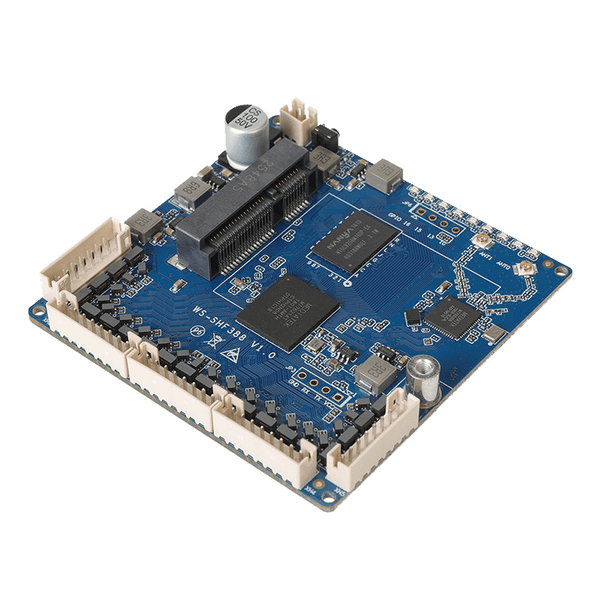
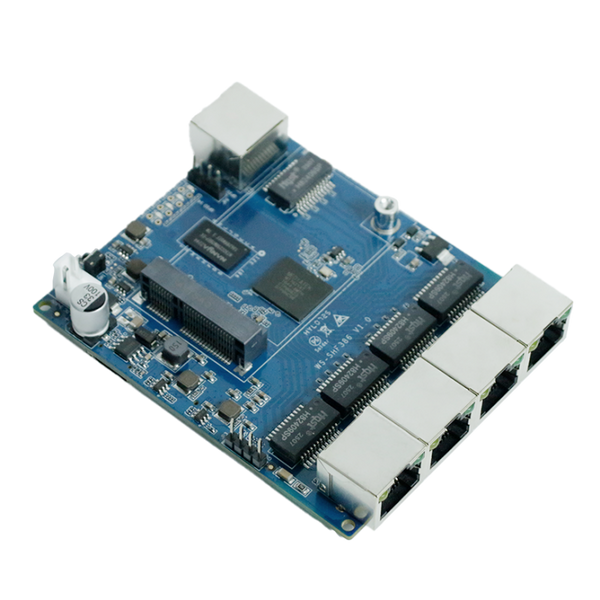
Gigabit Ethernet + a 4G module
SHF388 brings five Gigabit Ethernet connections to headers for integration with your wiring. SHF386 has five RJ45 sockets. Both document a Mini PCIe interface and Nano SIM slot for a 4G configuration.
See the modelsFOR DEVICE BUILDERS & OEM TEAMS
The right board starts with what your device needs to connect. Compare six HUASIFEI router boards by Ethernet connection, cellular expansion, size and power—then check the firmware for your exact hardware revision.

SHF388 brings five Gigabit Ethernet connections to headers for integration with your wiring. SHF386 has five RJ45 sockets. Both document a Mini PCIe interface and Nano SIM slot for a 4G configuration.
See the modelsSHF285 and SHF283 document RS232 and a Mini PCIe interface for a 4G module. Choose four LAN ports with SHF285 or three with SHF283; both use 10/100 Mbps Ethernet.
See the modelsSHF281 is documented at 58 × 58 mm and has three RJ45 sockets. SHF280 is a 38 × 38 mm core-board design with compact connectors. Both list 2.4 GHz Wi-Fi; check the space needed around the PCB too.
See the modelsUse the hardware differences below to make a shortlist. Open a model for its full specifications and configuration options.
Scroll horizontally to see all comparison fields.
| Model / platform | Ethernet & connector | Cellular / serial | DC input | Board size |
|---|---|---|---|---|
| SHF388MediaTek MT7621AT | 1 Gigabit WAN + 4 Gigabit LAN5 headers · 8-pin, 1.25 mm | Mini PCIe (4G) + Nano SIM; confirm serial interface / pinout | 5–24 V | 68 × 68 mm |
| SHF386MediaTek MT7621A | 1 Gigabit WAN + 4 Gigabit LAN5 RJ45 sockets shown | Mini PCIe (4G) + Nano SIM; confirm serial interface / pinout | 5–60 V | Confirm mechanical drawing |
| SHF285MediaTek MT7628N | 1 WAN + 4 LAN · 10/100 Mbps5 RJ45 sockets shown | Mini PCIe (4G) + Nano SIM; RS232 | 5–60 V | Confirm mechanical drawing |
| SHF283MediaTek MT7628N | 1 WAN + 3 LAN · 10/100 Mbps4 RJ45 sockets shown | Mini PCIe (4G) + Nano SIM; RS232 | 5–60 V | Confirm mechanical drawing |
| SHF281MediaTek MT7628N | 1 WAN + 2 LAN · 10/100 Mbps3 RJ45 sockets shown | Debug serial / GPIO; cellular interface not specified | 5–36 V* | 58 × 58 mm |
| SHF280MediaTek MT7628N | 1 WAN + 2 LAN · 10/100 MbpsCompact board connectors; confirm pinout | Debug serial / GPIO; cellular interface not specified | 5–24 V | 38 × 38 mm |
Ethernet ratings describe interfaces, not measured routing or cellular throughput. PCB dimensions exclude the space needed for modules, connectors, cables and mounting. “Confirm” means the reviewed specification does not settle that item.
* SHF281: the datasheet lists 5–36 V, while a product-photo marking differs. Confirm the supplied hardware revision and input rating before integration.
A Mini PCIe interface does not mean a modem is included. Confirm the modem, antennas and accessories in your quoted configuration.
GIGABIT · HEADERS
For wiring Ethernet into your own device: five Gigabit connections on compact headers, plus a documented 4G module interface.
2.4 GHz Wi-Fi · 300 Mbps class
View product SHF388GIGABIT · RJ45
A starting point when your enclosure can accommodate standard Ethernet sockets and a Mini PCIe 4G module.
Confirm Wi-Fi configuration and board dimensions
View product SHF3864 LAN · RS232
Four LAN ports, RS232 and a 4G module interface for devices that need several wired connections.
RS232 · 4-pin, 2.54 mm connector
View product SHF2853 LAN · RS232
A three-LAN alternative for integration projects that need RS232 and a 4G module interface.
RS232 · 4-pin, 2.54 mm connector
View product SHF283COMPACT · RJ45
A small Wi-Fi board with three Ethernet sockets when your design has room for direct cable connections.
2.4 GHz Wi-Fi · 300 Mbps class
View product SHF281COMPACT · CORE BOARD
A 38 × 38 mm core-board design for a compact host device. Plan the Ethernet wiring and connector pinout as part of integration.
2.4 GHz Wi-Fi · 300 Mbps class
View product SHF280Match the connector type, pitch and pinout to your host device. Leave room for cable bends, antenna leads, mounting hardware and any modem you add. A PCB footprint alone is not an enclosure drawing.
Check the input connector and polarity, then size the supply for the board and its peripherals. Include modem startup and transmit demand in your evaluation; an input-voltage range alone does not define the required current.
For SHF285 or SHF283, verify the RS232 pinout against your device. Debug serial and GPIO on compact boards should not be treated as RS232. For cellular, match the module, bands, carrier and antenna arrangement to the deployment country.
Test the interfaces, reconnect behavior and firmware features your device actually uses. Check thermal behavior inside the intended enclosure and agree on the board revision and supplied parts before planning a larger order.
The model specifications list manufacturer SDK and OpenWrt/LEDE-based software options. The useful next step is to identify the exact image and build target for the board you will receive.
Check the available download, hardware revision, release notes and recovery steps. Ask for the matching package if your model or revision is not listed.
Use the MT7621AT repository group as a source reference for SHF388 and SHF386, and the MT7628N group for SHF285, SHF283, SHF281 and SHF280. Repository grouping does not change the SHF386 hardware label, MT7621A.
A manufacturer build or public source tree does not establish support in an upstream OpenWrt release. Verify the exact device target, storage layout and supported release before choosing or building an image. Boards sharing a chipset may still need different firmware.
Choose a board when you need to integrate networking into your own enclosure, wiring or product. You will need to plan power, antennas, connectors, mounting and software. A finished router is usually a simpler starting point when a separate enclosed device fits the installation.
Not necessarily. SHF388, SHF386, SHF285 and SHF283 document a Mini PCIe interface for a 4G module and a Nano SIM slot. The supplied modem and accessories depend on the quoted configuration. Confirm the exact parts, country and carrier before ordering an evaluation unit.
Do not assume so. The board target, flash layout, Ethernet mapping and peripherals can differ. Use the image and recovery procedure confirmed for the exact model and hardware revision.
Start with your device, available space, Ethernet ports and connector preference, input supply and serial interface. Add your country and carrier if cellular is required, plus firmware requirements, evaluation quantity and expected project schedule.
HUASIFEI OEM / ODM
Share the connections you need and the space you have. We can then discuss the board revision, firmware, pinout and supplied parts for your evaluation.
Business inquiries are open. Retail online ordering is coming later.
LET’S CONNECT
Find the right router for your next project.
Jackie Fu
HUASIFEI team
Product & OEM/ODM enquiries
+86 159 8677 3006
Chat on WhatsAppOpens WhatsApp in a new tab.